
Cylance · Phase 1 of 2 — Enterprise
I joined as the first Director of UX/UI with a mandate to build the enterprise product and the design function from scratch. Operating model depth lives in Building Design That Ships; the Confidence Design System in One Source, Every Surface. Consumer expansion is Phase 2.
Context
In 2016, the endpoint security market ran on a model that had existed for decades: download a signature database, scan for known threats, alert when something matches. It was reactive by design, which meant it was always playing catch-up to new malware. Cylance came to market with a fundamentally different bet — a machine learning model that scored file attributes before execution and blocked threats based on predicted behavior, not known signatures. No daily updates. No database to maintain. Prevention instead of detection.
When I joined as the first Director of UX/UI, there was no product design function — only ad hoc visual work adjacent to engineering. By the time of the BlackBerry acquisition in 2019, we had a full product design org operating across the enterprise suite and a growing portfolio of adjacent tools. How that org was built — dual-track discovery, designer-to-developer workflows, and Design Inclusion as the retrospective summary — is documented in the design org case study.
The Design Problem
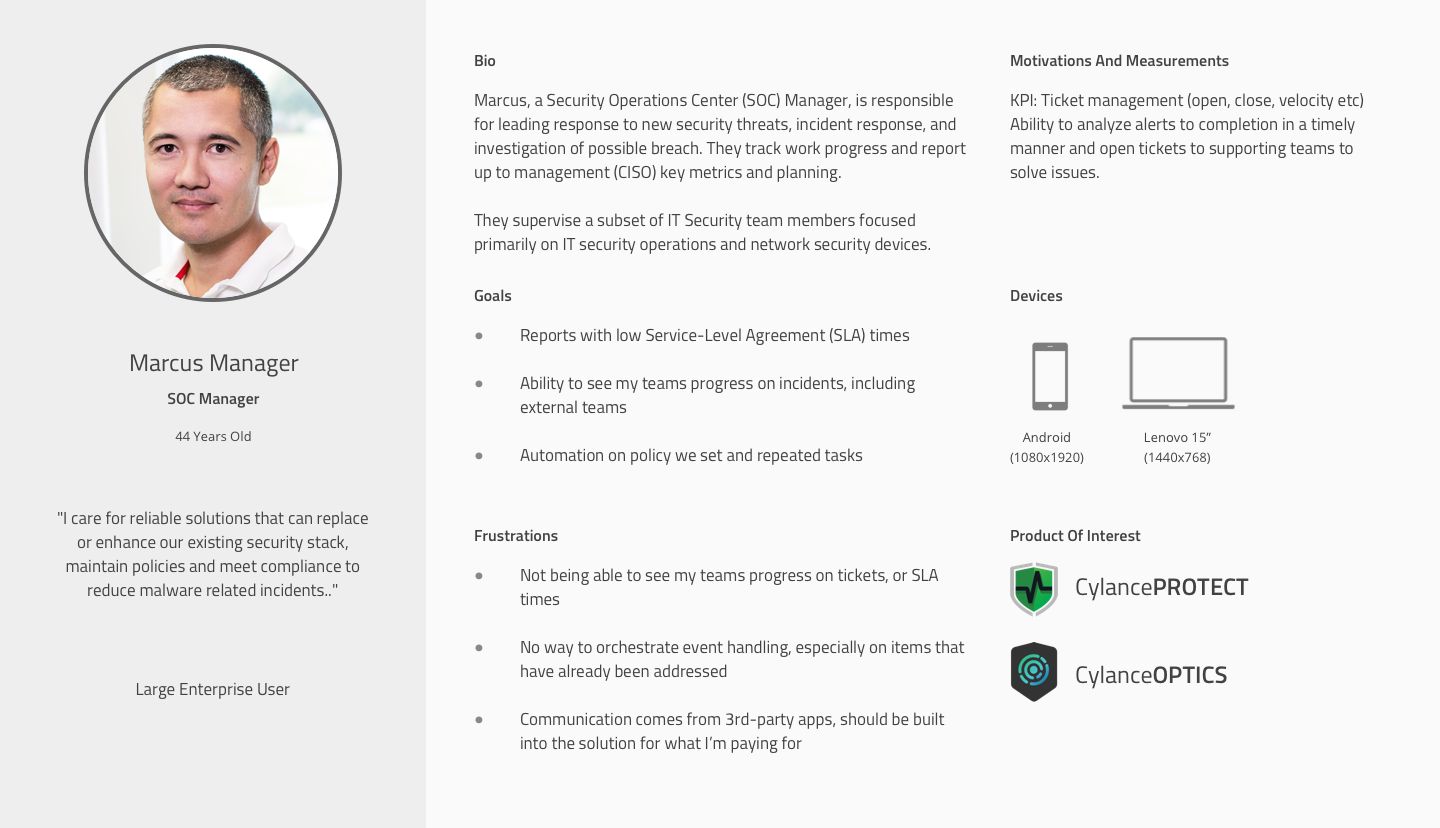
Pre-execution prevention sounds like a simple improvement. In practice it created a set of UX problems that had no existing template.
Insight
Traditional security UIs earned trust by showing threat evidence — quarantine logs, scan alerts, blocked files. Cylance's value was prevention before execution. When the product worked, there was nothing to show. Designing for absence was a different problem entirely.
Hypothesis
If the UI surfaced the AI model's confidence score and decision rationale — not just a binary allow/block outcome — operators could interrogate decisions without overriding them blindly, and trust would accumulate over time.
Decision
Designed around disposition with reasoning — score + file attributes + operator override controls — rather than just exposing the outcome, treating explainability as the primary UX surface rather than a secondary detail view.
The first was invisibility. When the product works, nothing happens — files are blocked before they run, threats are neutralized before anyone notices. Unlike traditional antivirus, which surfaced every quarantined file as evidence of its own value, Cylance’s core value proposition was the absence of an event. Designing an interface that made that absence feel meaningful — that translated “nothing happened” into a compelling signal — required rethinking what security dashboards were for.
The second was trust. Every blocking decision came from a confidence score produced by the model. Security operators — people trained to interrogate evidence, maintain chain of custody, and justify decisions to leadership — needed to understand not just what the model decided, but why, and how confident it was. Designing for model output meant designing for explainability before that was a mainstream concern.
What We Built
One of the first structural things I established was where UX sat in the development process — not at the end reviewing finished specs, but across all three phases: understanding (requirements, research, validation), solutioning (design, prototyping, usability testing), and building (design support, UAT).
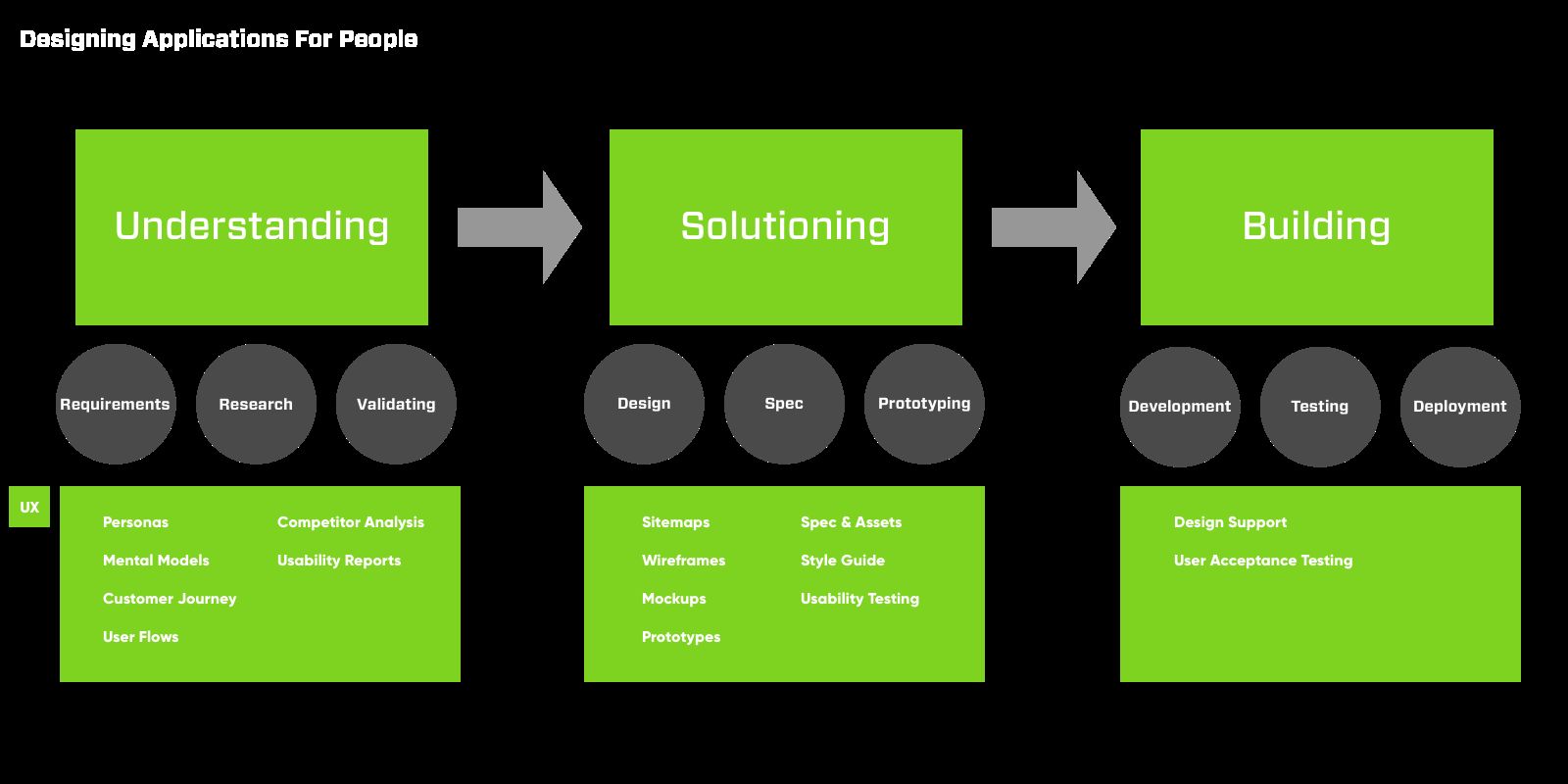
Making that explicit mattered in an engineering-led organization where “design” had meant visual polish applied at the end. Defining what design contributed at each phase — and what engineering could expect — was the foundation for the operating model that followed.
The enterprise console centered on three integrated layers. The dashboard reframed security posture as organizational health — not a list of alerts, but a continuous read on whether the environment was protected, trending in the right direction, and producing any signals worth acting on. It was designed to answer an executive’s question and an analyst’s question simultaneously, without compromising either.
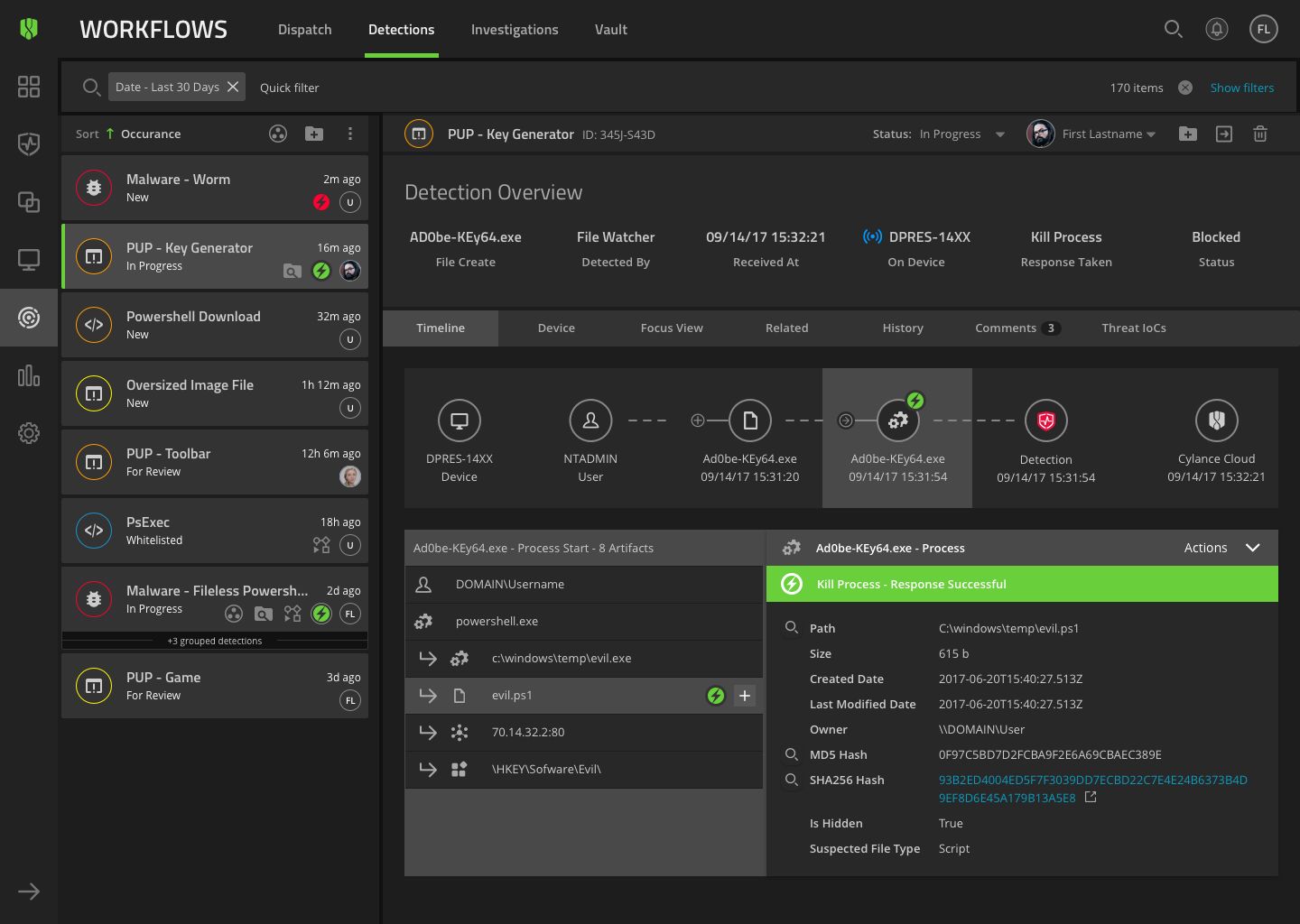
Below that, individual threat events surfaced the model’s confidence score alongside file attributes, execution context, and disposition options. Operators could interrogate every blocking decision, override it with documented rationale, and build institutional knowledge about their specific environment over time.
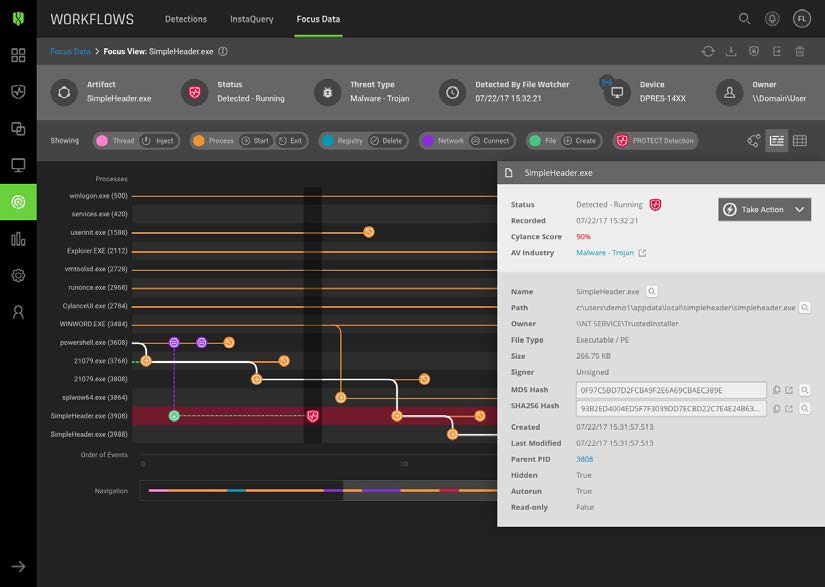
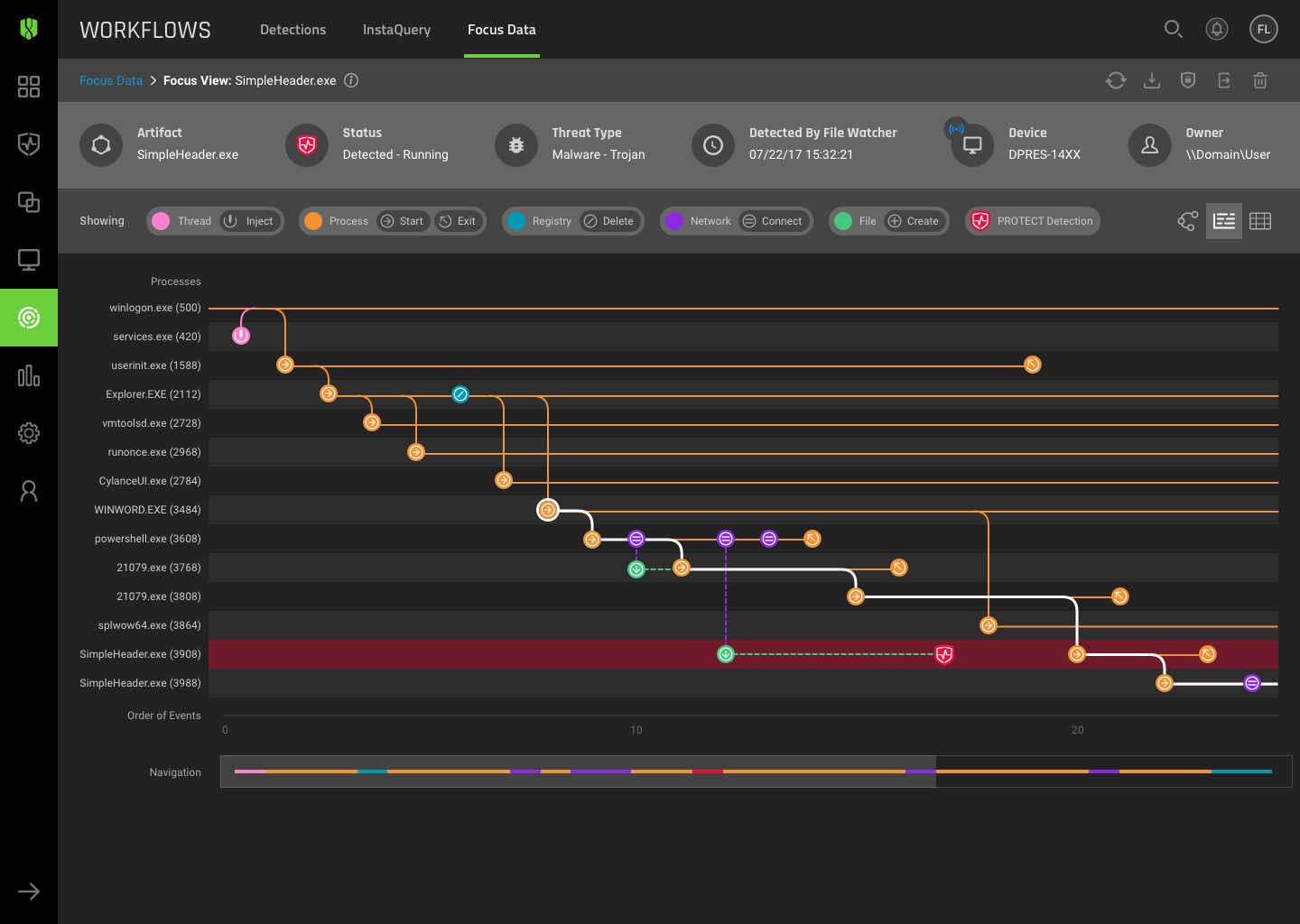
The third layer was Optics — a dedicated investigation and threat hunting surface that evolved across our tenure from a simple event timeline into a full EDR capability. It served threat hunters, detection engineers, and incident responders at different points in its life, adapting to each audience’s workflow rather than forcing them to adapt to ours.
Research Foundation
In 2018, midway through the Cylance tenure, I ran a formal UX research program to validate the product’s usability and surface what enterprise security operators actually needed from the console. The study reached 1,201 customers and collected 282 responses — a 23% response rate. The methodology was a System Usability Scale (SUS) survey with role-based segmentation across Help Desk, Alert Analyst, System Admin, IT Manager, CISO, SOC Manager, and Incident Responder.
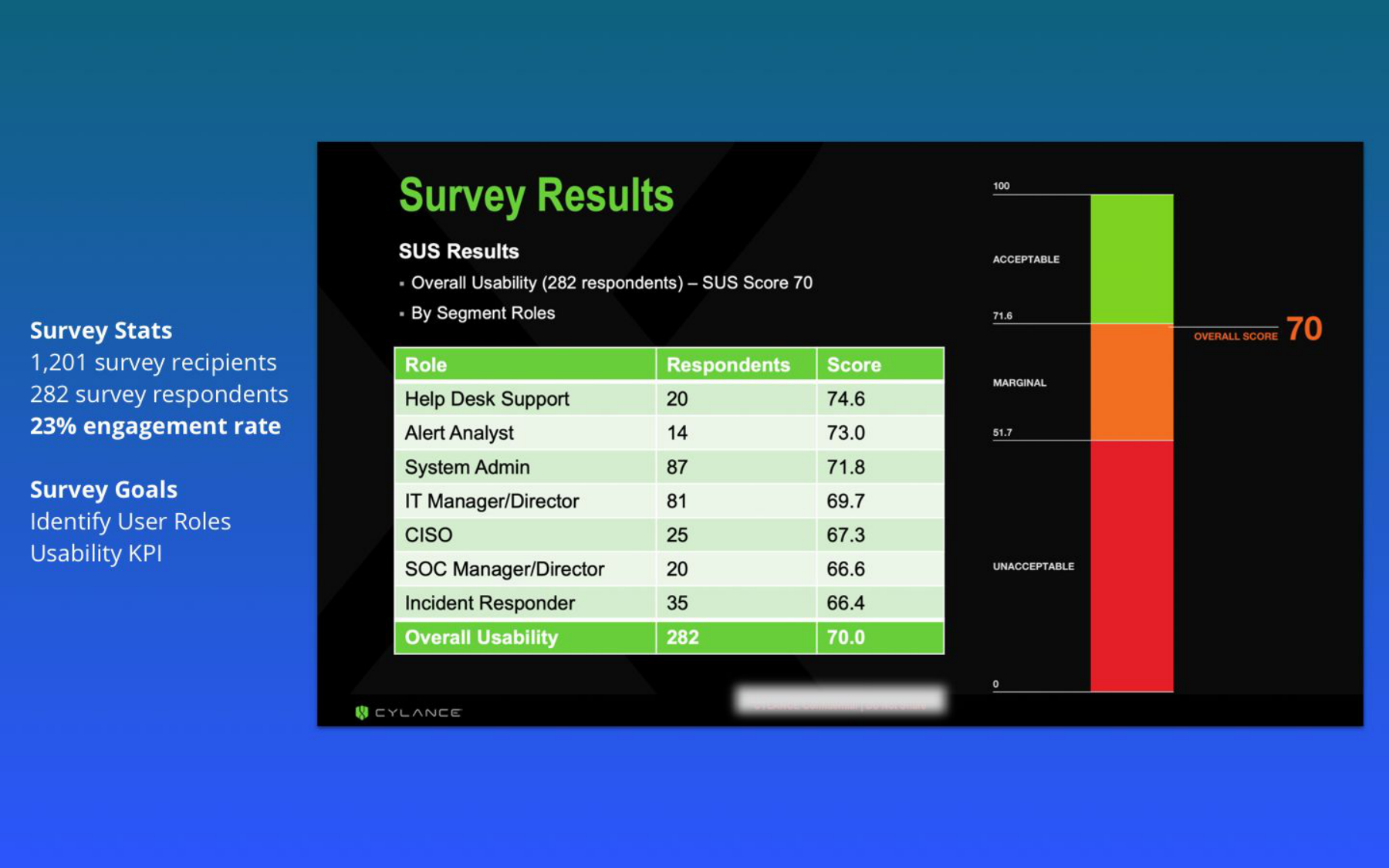
The overall SUS score of 70 placed the product in the “good” range — acceptable, but with clear gaps. The role segmentation was the more actionable finding: the users who scored the product lowest were SOC Managers (66.6) and Incident Responders (66.4) — precisely the operators running time-sensitive investigations, for whom friction has real cost. Help Desk scored highest (74.6), which made sense — their workflows were simpler and more linear. The mismatch between where the product felt easiest and where ease mattered most became the brief for the redesign.
Top complaint categories from the survey: analytics and reporting, events handling, and training. Those three mapped directly onto the dashboard architecture (reporting), the data grid patterns (events), and the onboarding and documentation work that followed.
The Console Redesign — What Shipped
The research gave us a validated brief. The redesigned console centered on three things the survey had identified as under-served: a dashboard that answered the executive and analyst questions simultaneously, a workbench rebuilt with data grid for events handling, and a report generation layer that didn’t require going outside the product.
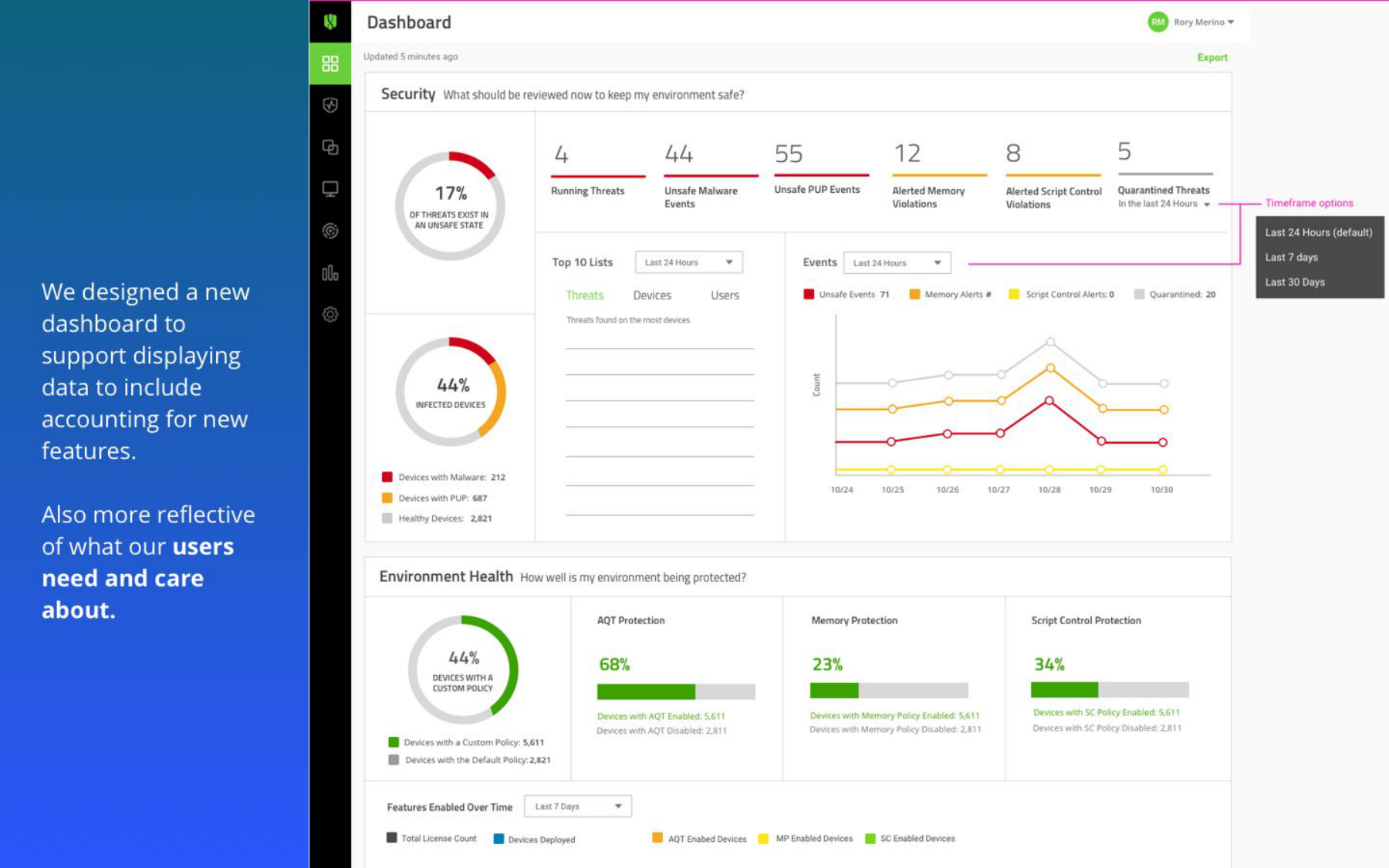
The dashboard was designed around the finding that Security Overview needed to answer an executive’s posture question and an analyst’s operational question without compromising either. The Environment Health section surfaced OS distribution and agent coverage — the signals that told operators whether the product was working, not just what it had blocked. Compliance gauges gave the CISO and IT Manager audience the reporting surface they’d ranked as a priority.
The redesign shipped as a limited release to select customers at the end of 2018, alongside role-based access controls (RBAC) and the React/Redux component library derived from the Confidence Design System. The Design Language System was documented on Confluence for ongoing engineering reference.
Forward Vision — Next-Gen SOC Platform (Not Shipped)
The most forward-looking work from the Cylance period was a SOC platform vision I developed toward the end of the engagement: a rearchitecting of the investigation surface for the next generation of security operations. This was a concept and design direction — not a shipped product.
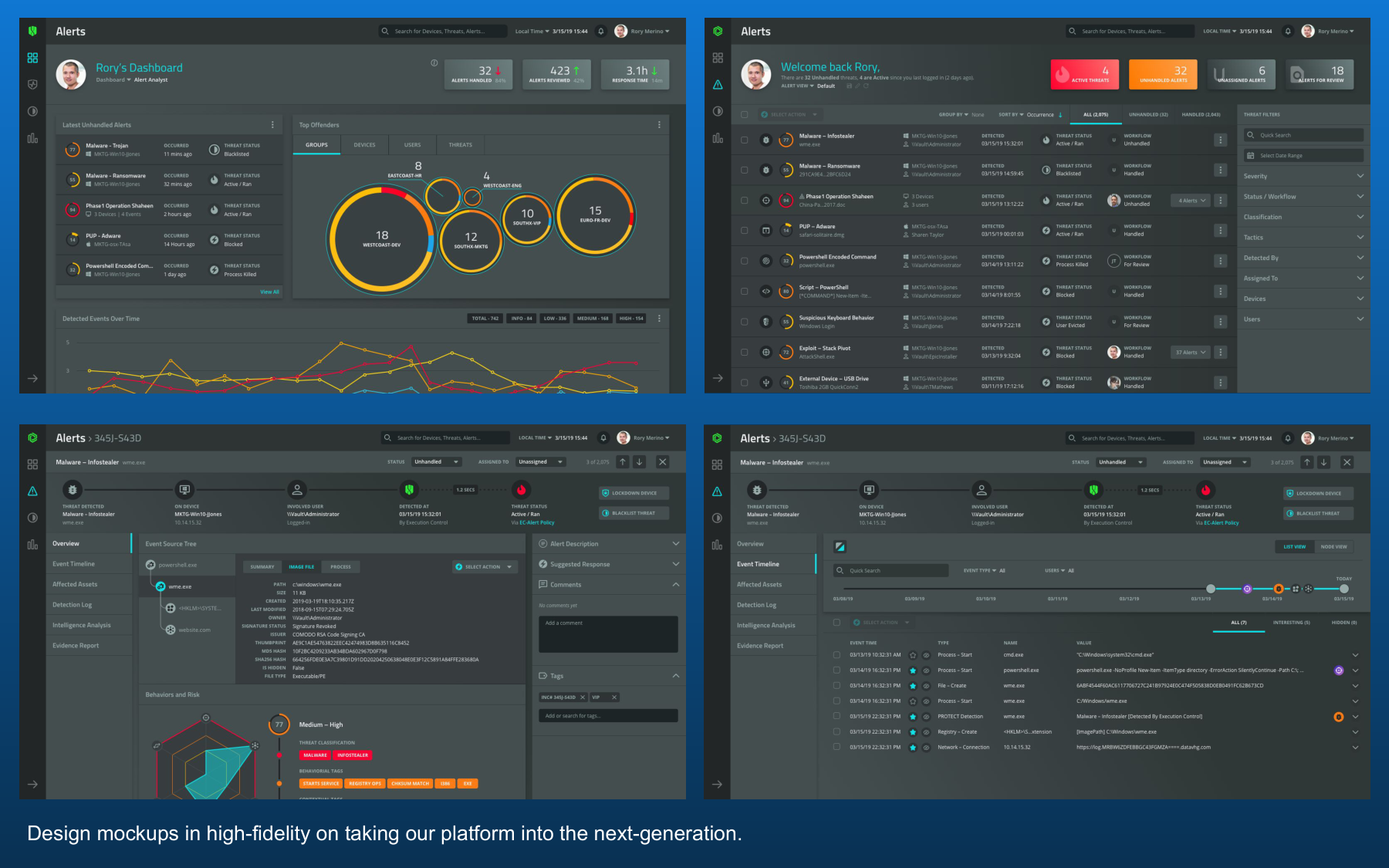
The concept moved beyond event management toward a collaborative investigation environment: an alert queue with AI-assisted risk scoring, a detail view that showed the full investigation timeline alongside model analysis, and an integrated workspace for multiple analysts coordinating on an active incident. For 2018, the visual language and interaction model anticipated how modern security platforms — and the AI-native SOC tools that followed years later — would eventually evolve. The SOC platform vision was design leading the thinking about where the product needed to go, not following engineering’s specification of it.
AI Decision-Making Pipeline
MITRE ATT&CK — From Tags to Kill Chain
One of the decisions I’m proudest of from this period was the early integration of MITRE ATT&CK framework mappings into the product UI. In 2017, ATT&CK was still a relatively niche framework used by threat researchers — it wasn’t yet the industry-standard vocabulary it became. We saw an opportunity to use it as a design tool: a shared language that could connect raw telemetry to meaningful context for analysts.
We started with technique tags on individual events — a small label showing which tactic and technique the detection mapped to, so analysts could answer “where does this fit in an attack chain?” without leaving the console. From there we evolved toward a visual kill chain layer in Optics that let responders see which ATT&CK stages were active in an incident, where lateral movement was occurring, and what hadn’t been reached yet.
Outcome
By the time BlackBerry acquired Cylance in 2019, the design function had grown from a single hire into a team running research, product design, and design operations across the enterprise portfolio. The Confidence Design System was in active use across engineering. Optics had evolved from an event log into a full EDR investigation surface.
The more durable outcome was the vocabulary and patterns we developed for AI-assisted security decisions — confidence scoring surfaces, disposition workflows, kill chain visualization tied to live telemetry. Much of that thinking predated the broader industry conversation about explainable AI by several years, and it carried forward into every product design role I’ve held since.
The same period also produced CylancePROTECT Home Edition — the consumer product that translated this ML engine for households. That expansion ran in parallel with the enterprise work documented here; the case study covers the B2C translation, business unit build, and self-service acquisition path.