
ActZero · Phase 3 of 3 — Surface
The portal shipped on a nine-week cadence (Phase 2). Security Assessments was the feature that made the service auditable over time — turning operational strength into renewal-ready proof. The brand surfaces that set customer expectations are in Phase 1.
Context
ActZero’s MDR service was operationally strong — 24/7 detection, analyst escalations, fast response. What it lacked was a way to show customers cumulative value over time. Incident reports existed. Aggregate security posture did not.
Customer security teams tracked compliance in spreadsheets — sometimes with a template from Customer Success, often with nothing structured at all. ActZero’s analysts already had extensive knowledge of each customer’s environment. The gap was a surface that made that knowledge visible, measurable over time, and defensible in board reporting, audit prep, and renewal.
I worked with the CTO and head of customer success to define what the assessment feature needed to accomplish — and how it would fit inside the portal IA already being built.
Insight
CMMC and CIS couldn't render in one surface without a translation layer neither framework provides — the hard problem was data model, not UI.
Hypothesis
A headline maturity percentage plus session workspace would change how renewals started — from incident anecdotes to posture trajectory.
Decision
Scoped v1 for assisted sessions only — maturity gauge for executives, control workspace for CS — and deferred self-service to v2.
Where This Feature Sits in the Portal
Security Assessments was one of six portal sections — the one still marked with a question mark when the portal blueprint was drawn. The two-path architecture was established at the IA stage, not during visual design.
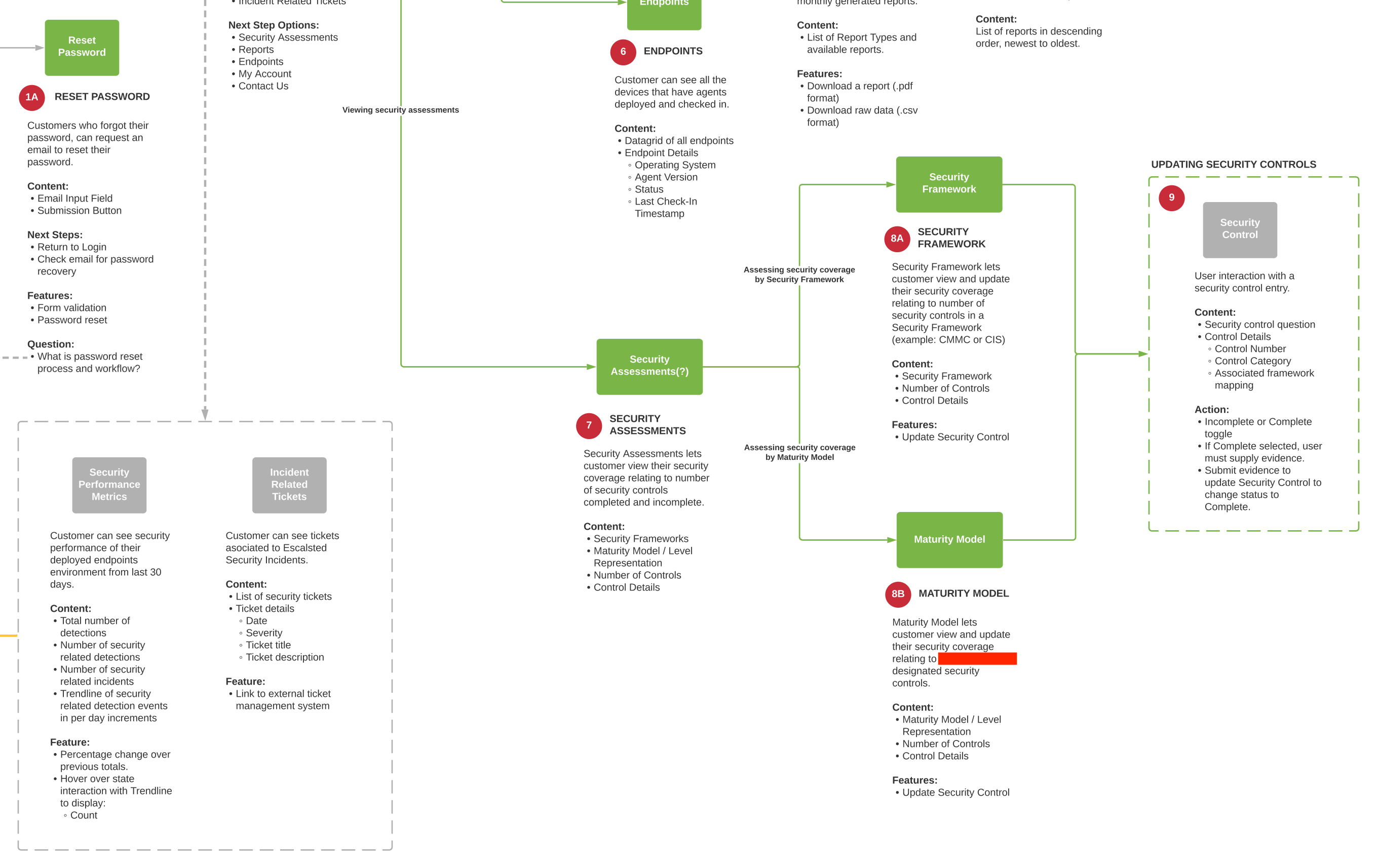
The shared workflow underneath both paths defined the collaborative loop: view control, toggle status, submit evidence, validate, mark complete. It was designed for ActZero’s vCISO model — Customer Success working through controls with customers in weekly sessions.
Framework Normalization
The most consequential design decision wasn’t visual — it was structural. ActZero’s customer base needed CMMC and CIS Controls, but the frameworks don’t present the same way. CMMC has five maturity levels that naturally show progression. CIS organizes by domain without an equivalent level structure.
The normalization layer anchored on CMMC maturity levels as the progression spine — the “you are here” context. CIS control domains became the working layer underneath, mapped to maturity levels where applicable. Difficulty tiering (Easy, Medium, Hard) was an operational overlay: the vCISO team knew which controls were quick wins versus policy rewrites or tooling changes. Making that visible gave customers a realistic view of improvement cost, not just control counts.
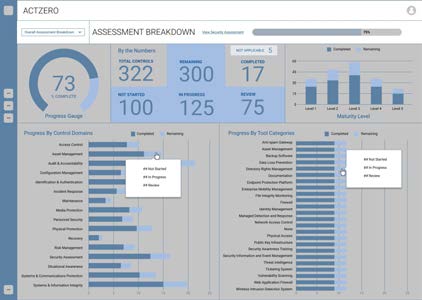
Three constraints shaped v1: consumable by non-security experts, supportive of collaborative weekly sessions, and shippable inside the first portal release — roughly a three-month window alongside the portal build.
What We Built
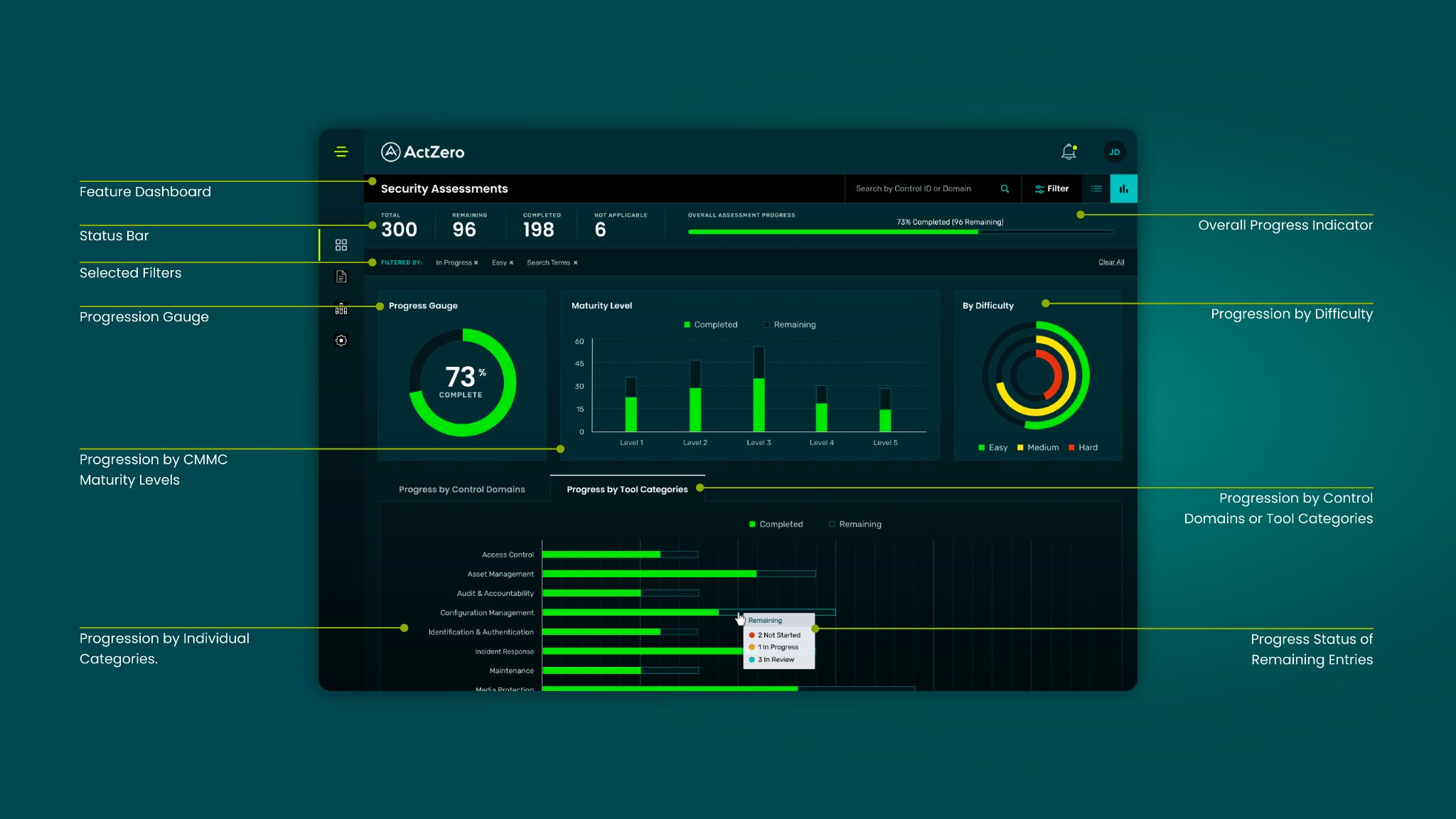
The dashboard gave customers an immediate posture read, then a working surface for the sessions that followed.
The executive read: Summary counts (total, completed, in progress, not started, not applicable) answered the opening question of every weekly session — “where are we?” A progression gauge translated raw counts into a single maturity percentage for board reporting. CMMC level breakdown and difficulty distribution showed where completion was concentrated and what remained achievable in the near term.
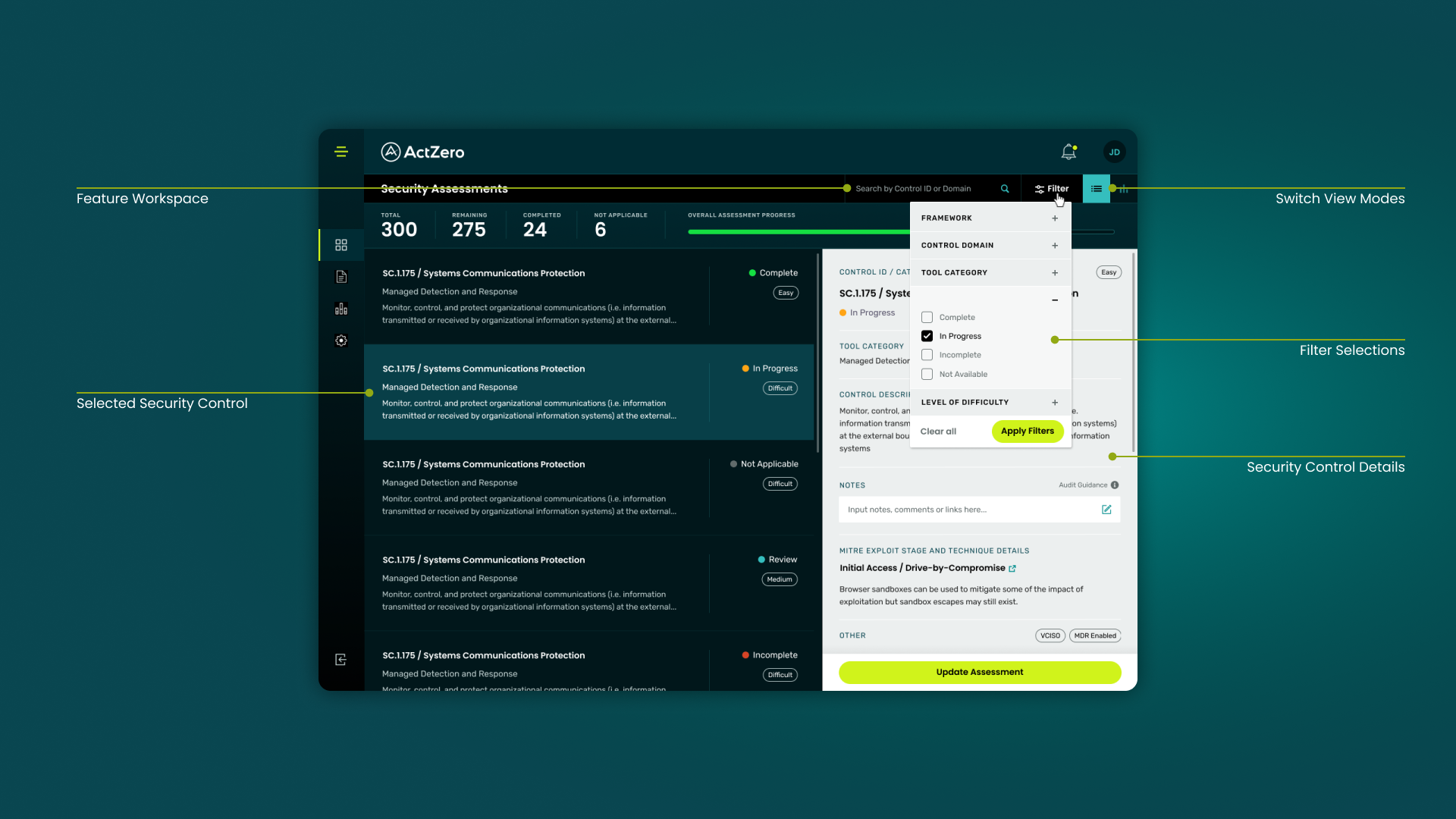
The session workspace: The control list, filter panel, and detail drawer were where vCISO sessions actually happened. Customer Success could filter by framework, domain, and status; open a control’s full description and difficulty; capture notes; and update assessment state in the same view — replacing the spreadsheet model with tracked, searchable state.
Domain breakdown bars at the bottom of the overview showed completed versus remaining controls per domain, with status tooltips (not started, in progress, in review) so CS could see blockers and customer actions in one glance during a live session.
The Assessment Flow
What Shipped and What Didn’t
v1 launched with the first portal release: dashboard overview, maturity gauge, level and domain breakdowns, collaborative session support, and control-level status tracking.
Deferred to v2: self-service assessment without scheduled CS sessions, evidence attachment per control, and cross-domain deep linking. v1 was scoped deliberately for the vCISO-assisted model and the team’s capacity — closer to how Customer Success was already working, not a full AuditBoard-style self-directed platform.
Outcome
The assessment feature changed the renewal argument. Where ActZero had previously relied on qualitative incident stories, customers could now bring a maturity percentage, domain breakdown, and in-progress evidence to board and CFO conversations.
Customer Success replaced spreadsheet templates with a structured session surface that tracked state automatically. For ActZero, that visibility layer made the MDR service legible over time — the artifact that turned operational strength into defensible, longitudinal proof.