SecureAuth · Foundation
Before Cylance's exit story, ActZero's zero-to-one, or BlueVoyant's digital transformation — this is where infosec, enterprise SaaS, and cross-discipline product work started. One case study, several threads: what shipped on the platform, what expanded the footprint, and what we explored ahead of the market. Operating model depth came later at Cylance; see Building Design That Ships.
Context
SecureAuth sat at the center of how enterprise organizations handled identity — but the experience it delivered to end users looked like it was built for sysadmins, not employees. Every login flow was IT-configured from the back end, with no user-facing polish and no way for customers to make it feel like their own product. The UI read like a router config panel: functional, brittle, and completely opaque to anyone outside an IT department.
I joined in 2012 as the first designer and front-end developer at SecureAuth — later Sr. Product UX Architect, Engineering — at a moment when identity was shifting from datacenter appliances to SaaS-extensible platforms. Over four years the work wasn’t one product bet. It was a portfolio: white-label SSO for enterprise customers, admin and provisioning surfaces for IT buyers, a developer SDK that had to win technical evaluations, native mobile apps for second-factor adoption, a cloud-hosted identity service, and research threads on phishing-resistant MFA and continuous authentication. That volume and variety is the point. SecureAuth gave me infosec vocabulary, enterprise SaaS delivery rhythm, and practice working across what larger orgs treat as separate tracks — design, front-end implementation, developer experience, and mobile — before I had a design org to run.
The Design Challenge
The problem wasn’t cosmetic. The existing flows had no concept of progressive disclosure, no graceful handling of authentication failures, and no way for customers to inject their own brand or logic.
Insight
SaaS companies evaluating SecureAuth had to accept the authentication UI as-is or pay for custom implementation. The developer and IT buyer — not the end user — were the real product customer. The login screen was actually a developer experience problem.
Hypothesis
If we built a white-label SDK layer that let customers fully own the login surface — without engineering effort on their side — adoption would accelerate and competitive deals would close faster.
Decision
Shifted focus from polishing the default UI to designing the SDK and configuration system — making the developer experience the product, so the end-user experience could be owned by whoever deployed it.
Three things needed to change simultaneously: the end-user flow had to feel designed, not configured; the white-label system had to let customers own the experience without engineering effort; and the underlying architecture had to support extensibility through code, not just settings.
What Shipped — White-Label Identity Platform
The core platform work was the authentication surface customers actually deployed: primary login, secondary factor selection, fallback paths, and SSO portal entry — a coherent multi-step flow with clear state management and honest error handling. The secondary factor system accommodated simultaneous method options: authenticator apps (TOTP), push notifications via the SecureAuth mobile app, SMS and email OTP, and hardware token fallbacks, all within a single branching flow that let users and IT administrators configure priority without creating dead ends.
The white-label SSO portal was built on AngularJS with a custom SDK package. A SaaS customer’s development team should be able to integrate the login experience, apply their brand, and extend the logic through webhooks and APIs — without involving us. Front-end and UX architecture were the same job here. I wrote the component specs, built the AngularJS implementation, defined the SDK contract, and documented the webhook model. Design and engineering weren’t two tracks — the credibility of the product in a sales conversation depended on them being one.
The preview mode — a fully functional branded demo buildable without production credentials — was a deliberate design decision for the sales cycle. Enterprise evaluations required showing customers what their login would actually look like on their brand, not a generic mockup. Making that self-serve changed how technical evaluations ran.
Client themes — front-end work in production
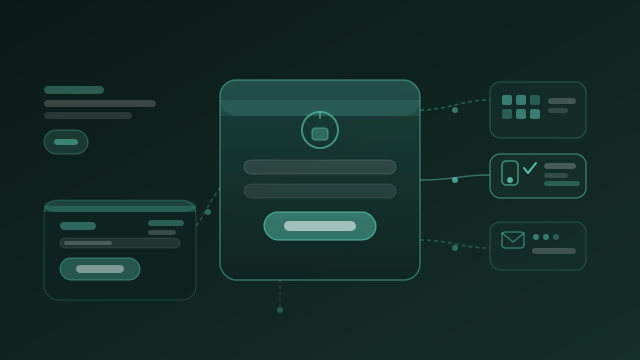
The white-label system wasn’t a skin on a fixed template. Each enterprise customer got a themed auth surface — logo, palette, photography, form layout, and instructional copy — built on a shared AngularJS component library (Bootstrap 2/3 era). Three screenshots below are production deployments from 2012–2016; the fourth is an abstract preview showing how brand tokens mapped onto the shared auth shell during sales evaluations. They look dated now — flat buttons, split-screen desktop layouts, pre-design-system typography — but the thinking underneath matches what became standard: per-tenant theming, light and dark panel treatments within the same flow, responsive breakpoints that reflowed the split layout on smaller viewports, and a single auth component set that engineering didn’t have to fork per customer.

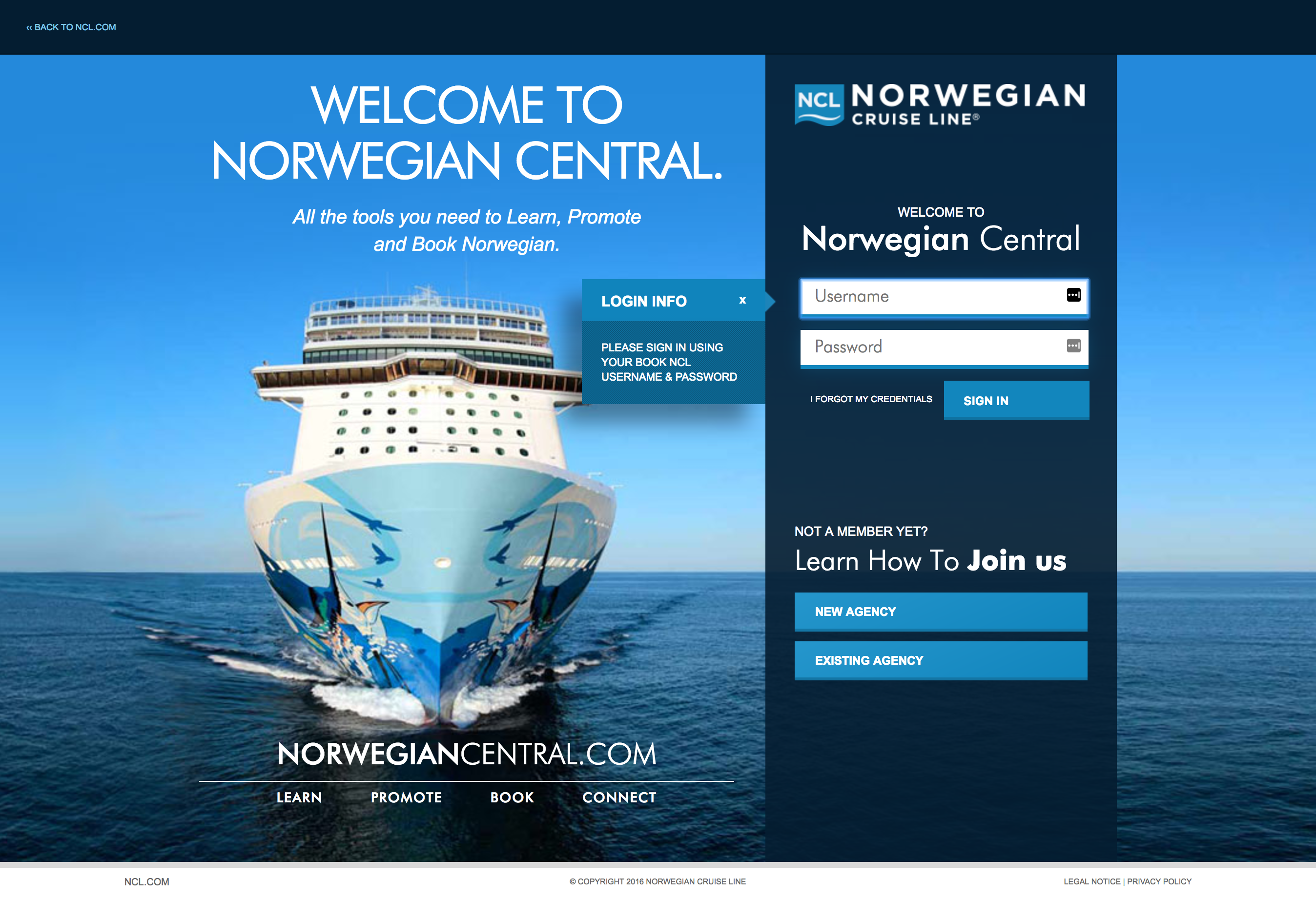
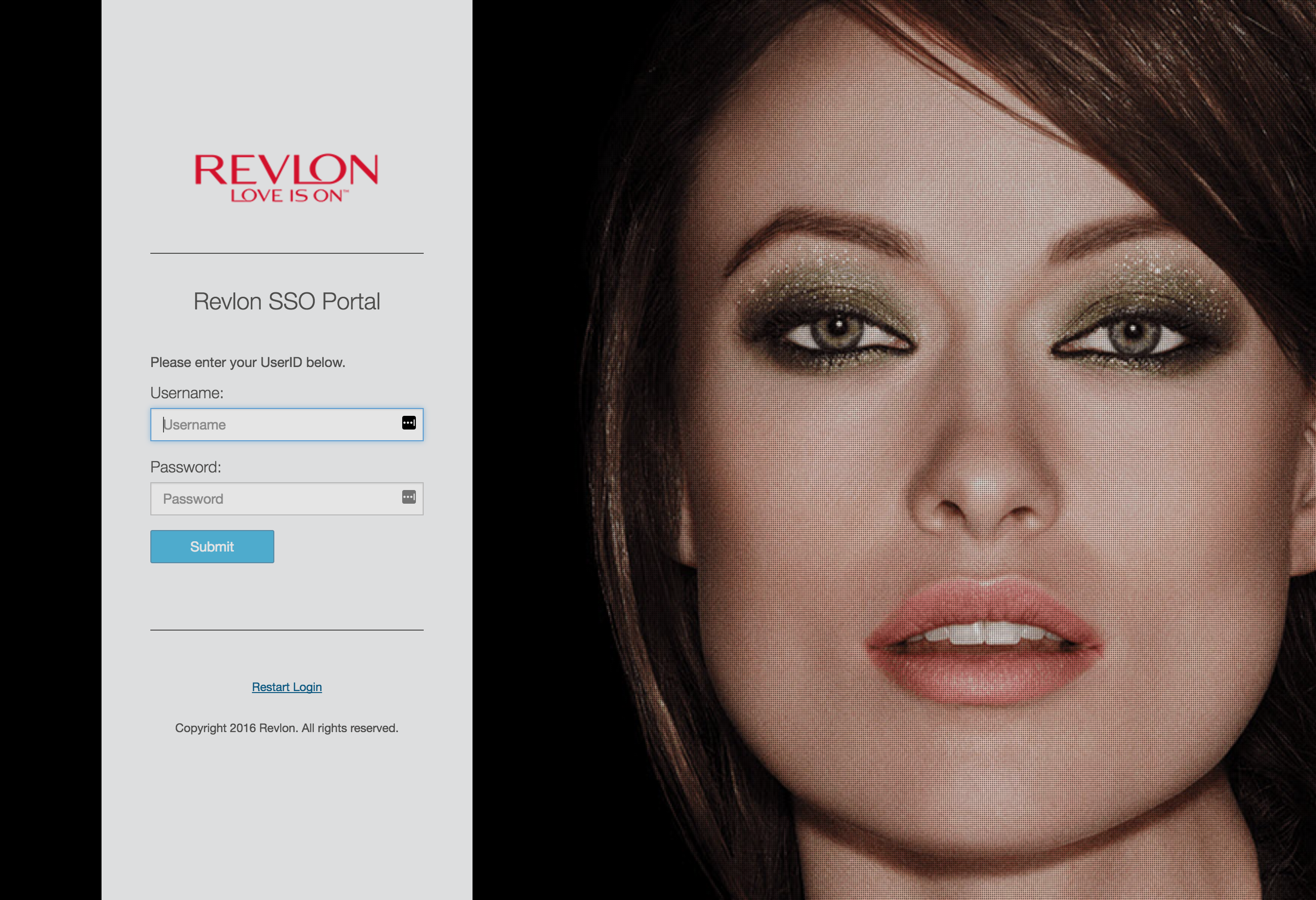
Each theme solved the same product problem differently. AEO used product photography as full-bleed background with a minimal white form column. NCL split a light promotional hero from a dark login panel — an early light/dark composition within one page. Revlon paired a light corporate form with dark campaign imagery. The Starbucks frame is an abstract preview — how a sales evaluation could visualize brand tokens on the shared auth shell before production credentials existed. All four ran on the same underlying flow; the SDK and theme configuration layer is what made that scalable without a professional services engagement per deployment.
Platform Depth — Admin, Adaptive Auth, and Developer Integration
The end-user login surface was the visible part. The more consequential design work for enterprise buyers was the admin layer — how IT administrators configured authentication policies per application and user group, and how the platform connected to enterprise identity sources.
Adaptive authentication was the product’s core differentiator — decisions evaluated against contextual signals (network location, device registration, time of day, behavioral patterns) rather than blanket MFA requirements. The design problem was making that logic configurable by an IT administrator without requiring them to understand the underlying rule engine. Policy screens had to translate conditional logic into plain-language settings that non-security-specialist admins could reason about and confidently set.
The SDK integration path was equally a design problem — what a developer needed to configure, what they could customize, and where the system handed off to their own logic:
Expanding the Footprint — Cloud, Mobile, and Self-Service
Most enterprise authentication in 2014 lived inside a company’s own network — credentials in Active Directory, IdP appliances racked in the datacenter, every new deployment requiring a services engagement. 2FaaS (Second Factor as a Service) put the IdP on Google Cloud Platform: externally hosted, self-provisioned, and accessible without datacenter infrastructure. A company could onboard to multi-factor authentication without a services contract or an AD dependency — a model AWS Cognito, Azure AD, and Okta would later scale.
The design challenge was the provisioning experience itself. Enterprise software onboarding had been a manual, back-channel process for so long that self-service felt implausible to buyers. The UX had to make the complexity disappear — clear enough for an IT administrator to trust the process, guided enough that misconfiguration wasn’t possible.
In parallel, I directed design and launch of native mobile apps across iOS, Android, and Windows — extending second-factor adoption beyond the desktop login surface. Mobile wasn’t a separate product line; it was another surface in the same identity platform, with the same trust contract.
Research Threads — Trust Beyond the Login
Not everything at SecureAuth was a shipped feature. Two research directions explored how authentication could handle probabilistic trust — work that connected directly to what I later designed at Cylance, where a pre-execution threat score had to earn operator confidence without exposing the model underneath.
Visual push verification addressed a known MFA weakness: users accepting push notifications they didn’t initiate. The concept replaced binary accept/deny with a visual challenge — the login portal displayed a server-generated image, and the mobile push delivered a grid where only one image matched. A phishing site with captured credentials couldn’t tell the user what to tap. The idea predates number matching (later adopted by Microsoft Authenticator and Google) and applies the CAPTCHA model to identity: proof that the same person is present at both ends of the session.
Behavioral biometrics explored continuous authentication — scoring keystroke rhythm and mouse movement against a per-user baseline throughout an active session. Unlike a hard auth failure, an anomaly score is probabilistic. The UX challenge was the response hierarchy: pass through invisibly at low deviation, step-up challenge at medium, terminate and alert at high. The middle tier was the hardest — friction that doesn’t feel arbitrary to a legitimate user typing differently that afternoon.
These threads stayed in research and concept. They matter here as foundation — early practice designing trust interfaces for machine outputs, before explainable AI was a category name.
Outcome
The redesigned login system became a meaningful differentiator in enterprise deals, particularly with SaaS companies that needed white-label SSO as a core requirement. Being able to show a custom-branded, fully functional demo — built on the actual SDK — changed the shape of technical evaluations. Developer integration time dropped because the SDK contract was designed around the developer’s workflow, not the platform’s internal model.
The durable outcome wasn’t a single feature launch. It was the foundation: infosec fluency, enterprise SaaS delivery at volume, and the habit of working across disciplines that larger companies separate. Modular auth flows, extensible identity architecture, developer experience as product design, adaptive policy translation, and trust interfaces for probabilistic outputs — those patterns carried directly into Cylance’s AI disposition surfaces and every cybersecurity product role after. SecureAuth is the chapter before the exit story, the zero-to-one, and the transformation work — the breadth that made the later director roles possible.